
As we are getting closer to finalizing course registrations and for incoming freshmen, CREATING schedules, here are a couple of quick tips to make sure you are prepared for your next semester at W&M!
Head to DegreeWorks
DegreeWorks is a great place to see which classes you still need to take for your major(s) or minor(s), even intended ones. How I recommend using it to its full potential is to go through all of the requirements you have left and type those courses into a Google Spreadsheet.
Create a General Plan
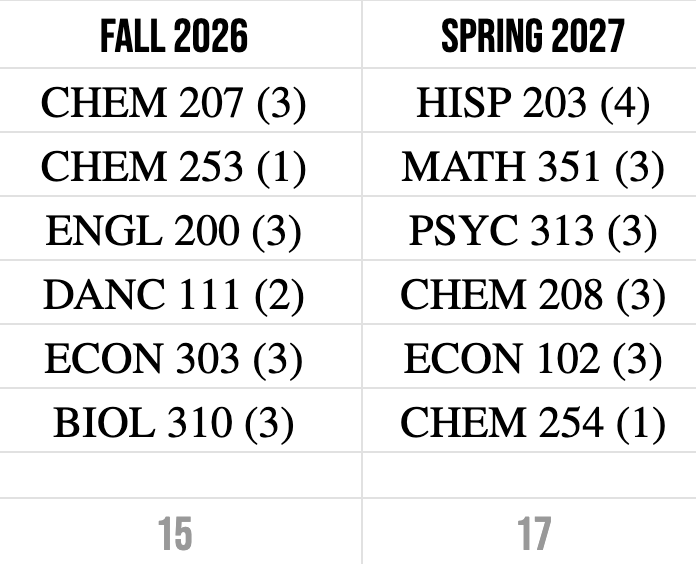
With the Google Spreadsheet of courses you need to take, I then recommend you categorize them into courses you need to take in the next year or later in your college career at W&M. With the courses you need to take soon, try your best to split them up into possible Fall and Spring semesters (going to PATH to see when courses are offered is a great way to do so).
—–Here is a sample of a 2 semester plan!
Go to PATH
Now, you can officially head to PATH and add these courses to your schedule! I know sometimes the classes can be full, but it’s never too late to add yourself to the waitlist. As someone who has gotten into my favorite classes from staying on waitlists, they are so worth it!
An Extra Step: Create an Assignment Tracker
I personally love my assignment tracker! It’s a great way to keep track of my homework, quizzes, exams, papers, etc. throughout the semester. I create a blank template (or find one) at the start of each semester and just add in all the due dates after the syllabus comes out!
Here are a few links to creating one:
Good luck with your next semester! As always, make sure to check out our other posts for more advice in navigating W&M!
Leave a Reply